FE650 Adjust the Dog - Introduction to Lightroom

Just as film photographers once watched their images emerge in the darkroom, digital photographers can transform their photos from basic snapshots into polished works. While we've traded chemical baths for computers, the art of developing our images remains just as important as capturing them.

Course Details
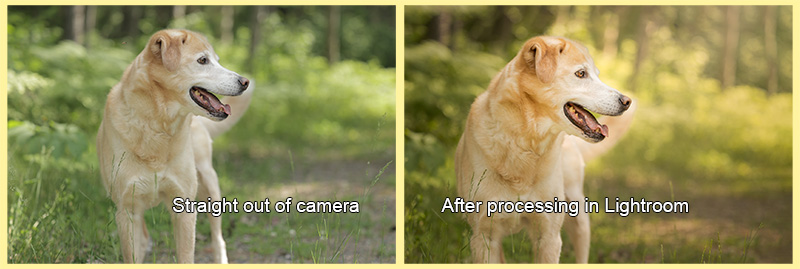
zorah compare

Are your photos not quite matching your creative vision? Do you find yourself wondering why your images don't have the same impact as those you admire? Does the thought of editing your backlog of images feel overwhelming? This class will show you how to use Adobe Lightroom Classic effectively and efficiently, breaking down complex editing concepts into a streamlined workflow that you can complete in 20 minutes or less.

Through structured lectures, demonstration videos, and hands-on assignments, you'll learn:

  • A systematic, time-saving approach that eliminates editing guesswork
  • How to enhance what worked in your original capture
  • Techniques to fix common issues like exposure and color problems
  • Methods to bring out the subtle details that make photos stand out
  • Ways to develop your own consistent editing style

Whether you're just starting with Lightroom or looking to strengthen your editing foundation, this class provides the guidance you need. You'll receive personalized feedback on your assignments and have access to expert help as you practice each new skill.

By the end of this course, you'll approach Lightroom with confidence and efficiency, knowing exactly how to guide your photos from initial capture to polished final image - without spending hours in front of your computer.

Please see the Equipment requirements for this class in the "Prerequisties & Supplies" section below.

Teaching Approach

  • 1-2 written lectures per week
  • Corresponding practice assignments
  • Primary content delivered through detailed written lectures
  • Supporting video content from the instructor as well as selected YouTube creators
  • Note: Video accessibility (subtitles/captions) varies by source

This structured approach allows you to learn at your own pace while ensuring you master each technique before moving forward. The combination of written lectures and video demonstrations accommodates different learning styles, while the mix of guided and creative assignments helps you develop both technical skills and artistic judgment.

Syllabus

This is a very broad overview of the topics we will cover and approximately when they will fall within the course.

Week 1:
Orientation
Workflow

Week 2:
Noise Reduction and Lens Profile Corrections
Crop Tool

Week 3:
Review of Histograms
Basic Controls for Global Adjustment

Week 4:
Masking for Local Adjustments

Weeks 5:
How to Compose Photos in Lightroom

Week 6:
Putting all the pieces together

Prerequisites & Supplies

Course Prerequisites - none, with the following caveat:Completion of Shoot the Dog and/or Expose the Dog is strongly recommended, but not required. You may sign up for a Gold level spot if you have not completed Shoot the Dog and/or Expose the Dog, but familiarity of the basic photography skills taught in those classes will be assumed. Equipment required for Gold students: Photo files in RAW format Required for Gold - Computer (Mac or PC) running the latest version of Lightroom Classic. This is obtained via a subscription to Adobe Creative Cloud (see below for details). Monitor Calibration hardware (see below for details) LIGHTROOM SUBSCRIPTION:For this class you need Lightroom Classic. You can sign up for a subscription to Adobe's Creative Cloud software here:https://creative.adobe.com/plans?store_code=en&promoid=KSDPZScroll down and select the "Lightroom (1TB)" plan for $11.99/month. This plan does *not* include Photoshop, but you do not need Photoshop for this class. If you would like to have a subscription that includes both Photoshop and Lightroom, you can select the "Photography (1TB)" plan that is currently $14.99 for the first six months of the subscription. But again, we will not be using Photoshop in this class so you do not need this subscription. The Lightroom plan will be sufficient. This is a computer-based course. There are many technical skills required to be successful in this class, including: Strong level of comfort with computers in general Understand the directory structure of your hard drive (where image files are located) Where to find files downloaded from a web browser How to upload photos to Google Photos album Create screenshots and upload them to a Google Photos album MONITOR CALIBRATION:If you have a MacBook Pro or Apple Studio Display, ignore the rest of this section. We will calibrate your monitor in class. You need to calibrate your laptop or desktop computer monitor to get the best and most consisitent color and brightness results from your post-processing. If your monitor is not calibrated, neither one of us can be confident that the photo looks the same on your screen as it does on mine. This is required equipment for all GOLD students. Please do not wait until class starts to order the calibration hardware. It is not just software, it requires an actual physical piece of equipment that you may need to have shipped to you. Order it as soon as possible and once it arrives, please calibrate your monitor. If you have problems, there will be a thread in the class forums that I will check before class starts. Post in that thread and I'll help you get unstuck. I recommend the Calibrite Display SL:https://a.co/d/bJ3ABqO This is a piece of equipment you'll buy once. I've been using the same one for years. If you want something a little more basic and inexpensive, I would recommend this:Calibrite Display 123 One other thing to be aware of is that the quality of your monitor will also have an impact on how your images look. If you're working with an old monitor or laptop, it is probably not going to show you the full range of brights and darks that a newer monitor will. (If you didn't think photography was a money pit before, you will now. ;-) )

Sample Lecture

This class uses a combination of written lectures, curated videos from other sources, and screenshare videos produced by Amy.
The following video is an example of a screenshare created during Adjust the Dog.
This is an excerpt from one of the written lectures from the beginning of class.
Lightroom Orientation: What is the Catalog?
The catalog is the key component of Lightroom that separates it from other photo browsers and from Photoshop.
Your images are the heart of your photo collection, but the Lightroom catalog is the brain. If your catalog gets corrupted or damaged, you won’t lose the original image files, but you will lose everything you have done to those images, whether it’s organizational (keywords and collections) or creative (the settings applied to the image). All of your hard work will vanish.
Lightroom is like the phone book that allows you to look up your images. Just like a person is not physically in the phone book, your photo is not physically IN Lightroom. Lightroom is a database, a directory.
Within that directory, you can create collections. Think of these like your contact lists. You have your “family” list, your “friends” list, your “never want to hear from you again” list, etc. Likewise, you may have your “birds” collection or your “dogs” collection.
Photoshop, on the other hand, has no directory or database associated with it. You have to open images using the “Open” command. Bridge (which comes with CC) allows you to browse folders of images, but it’s just a browser, not a database. It is not remembering *where* the images are located. You have to use the file structure you have created and remember where everything is. Photoshop is for post-processing, not organizing. Lightroom does both.

Instructor

Amy Johnson (she/her) is the official show photographer for many of the premier agility events in the United States, including the AKC National Agility Championships, AKC Agility Invitational, USDAA Cynosport World Games, UKI US Open, and NADAC Championships, as well as numerous local trials, regional events, and breed national specialties. She has photographed a wide variety of dog sports, including agility, obedience, rally, and conformation. (Click here for full bio and to view Amy's upcoming courses.)...

Read more

FAQ

Explore the questions we get asked most often and find out everything you need for a smooth experience with us.