FE635 Photoshop the Dog - Edit Tools for Photographers!
You've mastered your camera settings and learned the basics of Lightroom, but you're hitting its limits. That perfect portrait of your dog still includes a leash. Your bird photo has distracting branches. That agility photo would be amazing if you could just remove that person in the background. That's where Photoshop comes in—giving you precise control when Lightroom's global adjustments just aren't enough.
Course Details
This course introduces you to Photoshop with a practical photographer's perspective. I'll transform the technical complexity into straightforward solutions for common photo challenges. We'll focus exclusively on building your confidence with essential tools that solve real problems photographers face every day.
In this hands-on class, you'll start developing skills to:
- Remove distractions like leashes, background elements, or photobombers
- Understand how layers and masks create flexible, non-destructive editing options
- Make accurate selections to target specific parts of your image
- Begin working with simple composite techniques for creative options
- Learn to organize your Photoshop workspace for efficient photo editing
- Create basic text elements that complement your images
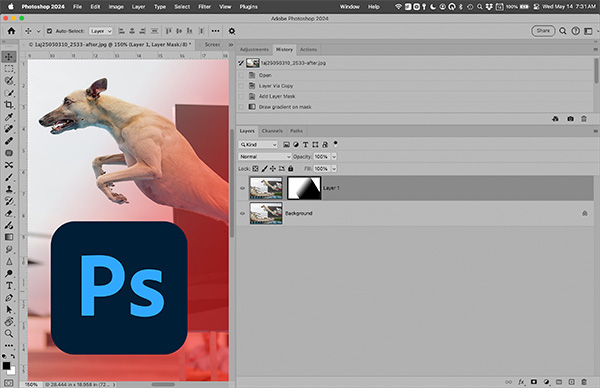
What makes this course different:
I've stripped away all the graphic design and digital art aspects to focus exclusively on what photographers actually need. Instead of overwhelming you with every possible tool, We'll concentrate on building a solid foundation through practical problem-solving. Each technique is demonstrated with real-world examples from dog sports, wildlife photography, and outdoor portraits.
I don't just show you which buttons to press—I explain exactly why we're using each tool and how it affects your image. You'll understand the fundamental concepts behind each technique, making it easier to adapt these skills to your specific photography challenges.
Teaching Approach
This course welcomes all types of learners. Each concept in presented in multiple ways:
- Visual learners: You'll see before/after examples and clear demonstrations
- Step-by-step learners: You'll receive logical sequences of actions with clear reasoning
- Hands-on learners: You'll apply each technique to your own images with guided practice
There will be no TA for this class.
Course Structure
- Course Materials: New lessons and assignments released on Sunday and Wednesday
- Progress Checks: Small, manageable exercises to reinforce key concepts
- NEW!! Office Hours: Weekly Zoom sessions for questions and demonstrations (recordings available)
- Final Project: An image showcasing your new Photoshop skills
Ready to expand your editing toolkit?
Photoshop has a reputation for being complex, but with the right introduction focused on photographer-specific needs, you can build a solid foundation for solving real problems in your images. Join me to transform your "I wish I could" moments into "I know exactly how to fix this" confidence.
Syllabus
If you want a more detailed version of the syllabus, you can see that HERE.
Week 1: Getting Started with Photoshop
Orientation & Interface Navigation
Lightroom-Photoshop Roundtrip & Layers
Week 2: Non-Destructive Editing Foundations
Layer Masks & Adjustment Layers
Selection Tools & Techniques
Week 3: Essential Retouching & Repair
Removing Distractions
Advanced Selection Techniques
Week 4: Photo Compositing Essentials
Basic Compositing Foundations
Retouching with Digital Painting
Week 5: Workflow & Output
Creating Efficient Workflows
Advanced Export & Final Integration
Week 6: Creative Elements & Completion
Text & Simple Design Elements
Final Project
Course Focus
Looking for Other Skills?
- For basic photo editing and organization, check out my "Adjust the Dog" Lightroom course
- To improve your photography techniques, "Shoot the Dog" covers camera fundamentals
- For action photography skills, "Chase the Dog" will help you capture movement effectively
Streamlined Content
Hands-On Learning Approach
Prerequisites & Supplies
Sample Lecture
Why I Don't Cover AI-Based Tools in Clone the Dog
As Adobe adds exciting new AI-based features like Generative Fill and Neural Filters to Photoshop, you might wonder why I don't include them in this course. Here's why:
Focus on Lasting Skills
The photography-specific Photoshop techniques I teach have remained relevant for over a decade and will continue to serve you well for years to come. While AI tools evolve rapidly (sometimes changing completely with each update), the core skills of working with layers, masks, and selections provide a foundation that remains consistent.
Building Your Understanding
AI tools can produce impressive results with one click, but they don't help you understand why or how those changes improve your image. By learning the fundamental processes behind these operations, you'll develop the judgment to recognize when an AI result looks unnatural or needs refinement—skills that serve you regardless of which tools you eventually use.
Practical Reliability
Many photographers need consistent, predictable results across multiple similar images. The traditional techniques I teach give you precise control that works reliably across your entire photo collection, while current AI tools can produce unpredictable variations that might require more work to standardize.
Building Better Shooting Habits
Something interesting I've noticed about photographers who rely solely on traditional editing techniques is they tend to become more deliberate with their photography. When you know exactly what goes into manually removing distractions or rebuilding edges, you naturally start paying more attention to composition and subject positioning during capture. This creates a valuable feedback loop between your editing and shooting skills that AI tools often short-circuit. The "hard way" sometimes teaches lessons that stick better.
Keeping Competition Options Open
Photography competitions have increasingly strict rules about image manipulation, with many explicitly prohibiting AI-generated content. If you're interested in entering competitions (now or in the future), building traditional editing skills keeps those doors open. I'd rather give you versatile techniques that work across all contexts than limit your options with tools that might disqualify your work in certain settings.
Navigating Evolving Ethics
The photography community is still figuring out where AI fits ethically. Deciding how much AI intervention is "too much" is a personal decision each photographer needs to make thoughtfully. In this class, my goal is to give you foundational skills that put you in control of your creative choices, rather than defaulting to AI simply because traditional techniques seem intimidating.
Technology Independence
Traditional Photoshop techniques work regardless of your internet connection, software version, or computer specifications. They're reliable tools you can count on whether you're editing at home, on a plane, or in a remote location. By focusing on these fundamental approaches, I'm ensuring you develop skills that remain accessible across different situations and equipment setups.
Once you've mastered the fundamentals taught in this course, you'll have the knowledge base to effectively evaluate and integrate AI tools into your workflow as they mature. I encourage students to explore these tools on their own after completing the course, with the critical eye developed through understanding how photo editing operations actually work.
I'm excited about how AI will continue to transform photo editing, but I believe that understanding the underlying principles of Photoshop creates more versatile, capable photographers who can adapt to any future developments in the software.
Instructor

Amy Johnson
Faculty
Amy Johnson (she/her) is the official show photographer for many of the premier agility events in the United States, including the AKC National Agility Championships, AKC Agility Invitational, USDAA Cynosport World Games, UKI US Open, and NADAC Championships, as well as numerous local trials, regional events, and breed national specialties. She has photographed a wide variety of dog sports, including agility, obedience, rally, and conformation. (Click here for full bio and to view Amy's upcoming courses.)...